Monday, March 2, 2026

D365 CE - Permissions for Units and Unit Groups

 Simple topic basically but I also had to retest it again. If you want to control the permissions for Units (uom) and/or Unit Groups (unitschedule), you must do this via the product entity. So, for example allowing create permissions for the product table, results in create permissions for Units and Unit Groups.


Hope this helps,

Cheers!

Monday, January 13, 2025

Dual Write - Debug Errors via D365 FO DualWriteErrorLog

To debug the errors in Dual Write, in addition to the normal Error Log in Data Management, the following approach can be used.

  1. Open D365 FO as Admin-User
  2. Search for "Excel Workbook Designer" https://YOUR-FO-INSTANCE/?cmp=DE02&mi=ExportToExcelWorkbookDesigner
  3. Search for "dualwrite"
  4. Select "DualWriteProjectConfiguration"
  5. Select "All Fields"
  6. Click "Create workbook"
  7. Click "Download"
  8. Open the Excel file and click "Enable Editing"
  9. Authenticate with your D365 FO Admin user in the Dialog window (FO-Connector)
  10. Search for Entity Name in list of Projects (column B - External entity name)
  11. Search for column "IsDebugMode"
  12. Change both lines to "Yes"
  13. Remove all filters from Excel (column B)
  14. Click Publish
  15. Open Error Log Url in D365 FO https://YOUR-FO-INSTANCE/?mi=SysTableBrowser&TableName=DualWriteErrorLog
  16. Reproduce the issue in the application
  17. Reopen the URL (step 15 again) and click the Office icon in top right corner
The result contains the error messages in column "DetailedError Message".

Note: Dont forget to change "IsDebugMode" back to "No" after troubleshooting session.

Cheers!

Thursday, November 28, 2024

Dual Write Error - Query extended range failure: Syntax error near 94

The error "Query extended range failure: Syntax error near 94" was showing up when a Vendor was created in D365 FO. The setup includes Global Address Book with Vendor Concept based on Accounts.

The root cause of the issue was a typo in the Filter Condition - Left Hand Side - FO.

(((VendorPartyType == "Organization") || (VendorPartyType == "Person")) && (VendorGroupID != 'ABC'))

As described in the Filter documentation (Link), double quotes must be used for string instead of single quotes. The following query works fine.

(((VendorPartyType == "Organization") || (VendorPartyType == "Person")) && (VendorGroupID != "ABC"))

Cheers!

Friday, September 1, 2023

Dual Write Error - Write failed for entity CDS Contacts V2 with unknown exception

In my current project we had to remove the Global Address Book Solution for Dual Write from the Environment. During this process, the following error was occurring on Customer Create.


Write failed for entity CDS Contacts V2 with unknown exception - Field 'Associated party number' must be filled in.\nvalidateField failed on field 'smmContactPersonCDSV2Entity.AssociatedPartyNumber'


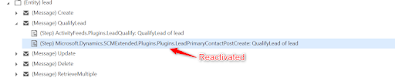
The problem was that the plugin "Microsoft.Dynamics.SCMExtended.Plugins.Plugins.LeadPrimaryContactPostCreate: QualifyLead of lead" was still deactivated. This Plugin is about to be disabled on install of GAB (Link) and this Error is what you are facing if you do not enable it afterwards.


Dual Write GAB Plugin to be reactivated


Cheers