So here is one example using .NET (c#) and a second one using Javascript (jQuery).
If you want to view the final sourcecode, check it out from codeplex.
http://odataconsuming.codeplex.com/
You also can download the final solution as zip-File.
http://odataconsuming.codeplex.com/downloads/get/467041
You can find Part 2 of this documentation here.
Preparation
- Install NuGet
- Install WCF Data Services 5.0
Creating Custom WCF Data Service
- Create new Empty Web Application
- Add Entity Framework (via NuGet)
- Add jQuery (via NuGet)
- Add new Item --> Web --> WCF Data Service (for oData V3)

- Create entity-class
using System;
using System.Collections.Generic;
using System.Linq;
using System.Web;
using System.Data.Services.Common;

namespace MK.oDataConsuming.Web {

    [DataServiceKey("Id")]
    public class Car {
        public int Id { get; set; }
        public string Manufacturer { get; set; }
        public string ProductionYear { get; set; }
    }
}
- Create Context
using System;
using System.Collections.Generic;
using System.Linq;
using System.Web;
using System.Data.Entity;

namespace MK.oDataConsuming.Web.Model {
    public class CarContext  {

        private List<Car> _cars;

        public CarContext() {
            _cars = new List<Car>();
            _cars.Add(new Car() { Id = 1, Manufacturer = "BMW", ProductionYear = "1997" });
            _cars.Add(new Car() { Id = 2, Manufacturer = "Mercedes", ProductionYear = "2000" });
            _cars.Add(new Car() { Id = 3, Manufacturer = "Opel", ProductionYear = "2011" });
            _cars.Add(new Car() { Id = 4, Manufacturer = "Ford", ProductionYear = "1999" });
        }

        public IQueryable<Car> Cars {
            get {
                return _cars.AsQueryable<Car>();
            }
        }
    }
}
- Configure access rules
using System;
using System.Collections.Generic;
using System.Data.Services;
using System.Data.Services.Common;
using System.Linq;
using System.ServiceModel.Web;
using System.Web;

using MK.oDataConsuming.Web.Model;

namespace MK.oDataConsuming.Web
{
    public class CarService : DataService<CarContext>
    {
        // This method is called only once to initialize service-wide policies.
        public static void InitializeService(DataServiceConfiguration config)
        {
            config.SetEntitySetAccessRule("Cars", EntitySetRights.All);
            config.DataServiceBehavior.MaxProtocolVersion = DataServiceProtocolVersion.V3;
        }
    }
}
- Set .svc as Start Page
- Test Service

Create HTML Test-Page
- Add new Item --> Web --> HTML Page
- Add HTML-Code to file
<!DOCTYPE html PUBLIC "-//W3C//DTD XHTML 1.0 Transitional//EN" "http://www.w3.org/TR/xhtml1/DTD/xhtml1-transitional.dtd">
<html xmlns="http://www.w3.org/1999/xhtml">
<head>
    <title>oData Access</title>
    <script src="Scripts/jquery-1.7.2.min.js"></script>
    <script src="Scripts/json2.js"></script>
    <script src="Scripts/odataaccess.js"></script>
</head>
<body>
    <div>
        <input id="RetrieveButton" type="button" value="Retrieve" onclick="RetrieveData()" />
    </div>
    <div id="listofcars">
    </div>
</body>
</html>
- Add new Item (to Scripts-Folder) --> Web --> JScript File

- Add Javascript Code to file
//Retrieve data from service
function RetrieveData() {
    $.ajax({
        type: "GET",
        async: false,
        contentType: "application/json; charset=utf-8",
        datatype: "json",
        url: "/CarService.svc/Cars",
        success: RetrieveMultipleCallback,
        error: function () {
            alert("Error");
        },
        beforeSend: function (XMLHttpRequest) {
            XMLHttpRequest.setRequestHeader("Accept", "application/json;odata=verbose");
        }
    });
}

//Handles the RetrieveMultiple Response
function RetrieveMultipleCallback(data) {
    $.each(data.d, function (i, item) {
        var $newDiv = $("<div>" + item.Manufacturer + " - "  + item.ProductionYear + "</div>");
        $("#listofcars").append($newDiv);
    });
}
The Most important part ist the "beforeSend" Handler. Here we set the RequestHeader "Accept: application/json;odata=verbose". In older versions of WCF Data Services, this was "Accept: application/json" This does never work!
- Test the Page

Create Console Application
- Add new Console Project
- Add Service Reference

- Add Code to Program.cs
using System;
using System.Collections.Generic;
using System.Linq;
using System.Text;

using MK.oDataConsuming.ConsoleApp.CarServiceReference;

namespace MK.oDataConsuming.ConsoleApp {
    class Program {
        static void Main(string[] args) {

            //Create Service Contexst
            CarContext context = new CarServiceReference.CarContext(new Uri("http://localhost:1184/CarService.svc"));

            //Create query, retrieve and convert to list
            var query = context.Cars.Where(c => c.Manufacturer == "Opel");
            List<Car> resultSet = query.ToList();

            //Check results
            if (resultSet != null && resultSet.Count > 0) {
                Car opel = resultSet[0];
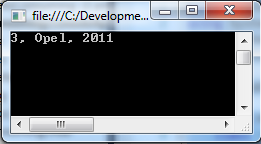
                Console.WriteLine("{0}, {1}, {2}", opel.Id, opel.Manufacturer, opel.ProductionYear);
            } else {
                Console.WriteLine("Car not found.");
            }

            Console.Read();
        }
    }
}
- Test the application
Cheers
