Thursday, September 12, 2013

CRM 2011 – ErrorCode=0x80041102 The entity with ObjectTypeCode –1 was not found in the MetadataCache

I ran into this problem on my last project. This issue only occurs on the productive system when someone is opening the solution (delivered by us). QA, Dev and so on worked fine.

We were able to solve this doing a good old IISReset.

There are a lot of other reasons for this (or nearly the same) error.

cheers

Simple reading of CSV Files - CsvHelper

In my last project we had to retrieve a huge amount of data from an existing CSV-File. I found a nice, fast, little library on GitHub called CsvHelper.


The easiest approach is to create a target class for this if the columns of the CSV-File does not match to the properties of your default business object.

   1: using System;
   2: using System.Collections.Generic;
   3: using System.IO;
   4: using System.Linq;
   5: using System.Text;
   6:  
   7: using CsvHelper;
   8:  
   9: namespace MK.CsvExample
  10: {
  11:     class Program
  12:     {
  13:         static void Main(string[] args)
  14:         {
  15:             using (TextReader reader = File.OpenText(@"C:\tmp\Users.csv"))
  16:             {
  17:                 var csv = new CsvReader(reader);
  18:                 csv.Configuration.Delimiter = ";";
  19:  
  20:                 var usersFromCsv = csv.GetRecords<User>();
  21:  
  22:                 foreach (var user in usersFromCsv)
  23:                 {
  24:                     Console.WriteLine("{0} {1}, {2}, {3}, {4}",
  25:                         user.Firstname,
  26:                         user.Lastname,
  27:                         user.Street,
  28:                         user.City,
  29:                         user.Country);
  30:                 }
  31:             }
  32:             Console.ReadKey();
  33:         }
  34:     }
  35:  
  36:     /// <summary>
  37:     /// BusinessObject for getting CSV-Informations
  38:     /// Names needs to be the same as in the CSV-File
  39:     /// </summary>
  40:     public class User
  41:     {
  42:         public string Lastname { get; set; }
  43:         public string Firstname { get; set; }
  44:         public string Country { get; set; }
  45:         public string City { get; set; }
  46:         public string Street { get; set; }
  47:     }
  48: }

For usage of CSV-Files created in Excel, you have to change de Delimiter to a semicolon (see line 18).
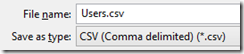
csv-save

A NuGet package is also available: “PM> Install-Package CsvHelper”

cheers


Monday, September 2, 2013

Connect Scribe CRM Adapter to Microsoft Dynamics CRM Online

The official documentation for creating a connection between Scribe and Microsoft Dynamics CRM online seems not to be up to date.

The following configuration works fine.


It is important to use the discovery link as Server URL.

cheers

Scribe Certificates (Server / Microsoft Dynamics CRM Adapter)

Last week i have finished the Scribe-Certifications
  • Scribe Server Training
  • Scribe Adapter for Dynamics CRM
For preparation, i used the following training-sessions
  • Scribe Insight Overview
  • Workbench Training
  • Server Training
  • Adapter for Dynamics CRM Training
  • Integration for Dynamics GP and Dynamics CRM

The training material was very helpful and good to handle. You get a set of videos, a workbook with labs and a virtual machine (VMware) to complete the labs.

I recommend to use the official Scribe Documentation (.CHM) for doing the tests.

cheers